How to Build a Social Media Content Calendar You’ll Actually Stick To
A social media content calendar for small businesses: what goes in each row, how often each platform says to post, how far ahead you can schedule, and every date worth planning for from December 2026 to March 2027.
 Mehul KarotraFounder, U Scale
8 min read
It’s 9 pm on a festival eve. You’ve just remembered that you haven’t posted anything, so you grab a photo from your gallery, type “Happy Diwali from all of us”, and hope it does something. It usually doesn’t.
A social media content calendar is the fix for that evening. It’s a plain list of what you’ll post, where and when, made a few weeks ahead so you’re never posting in a panic. You don’t need an expensive tool for it. A spreadsheet and an afternoon are enough.
This guide shows how to build one: what goes in each row, how often to post on each platform (in the platforms’ own words), how far ahead each app lets you schedule, and every date worth planning for from December 2026 to March 2027.
What is a social media content calendar?
It’s a schedule of your posts, written down before you make them. Each row is one post: the day it goes out, the platform, what it’s about and whether it’s ready.
Meta even builds one into its own app. Meta Business Suite describes its planner as a place to “create, schedule and manage your Facebook and Instagram content, then see your scheduled content in the Meta Business Suite calendar view.” That view is useful, but it only shows what you’ve already made. The planning happens before that, on paper or in a sheet.
The calendar is where your social media strategy turns into actual posts. Strategy is deciding who you’re talking to and what you want them to do. Content planning is deciding what to post on Tuesday.
What goes in each row of the calendar?
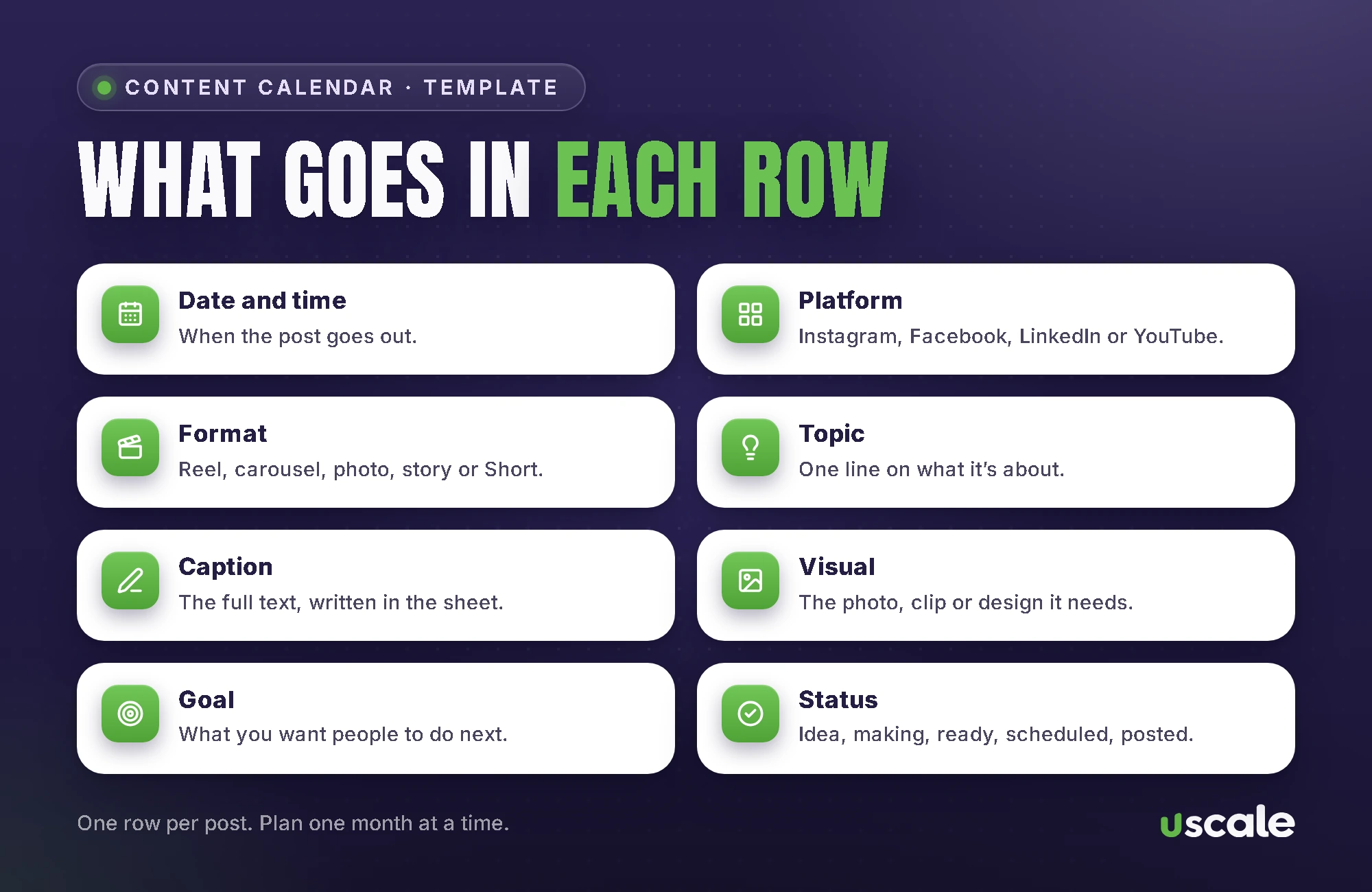
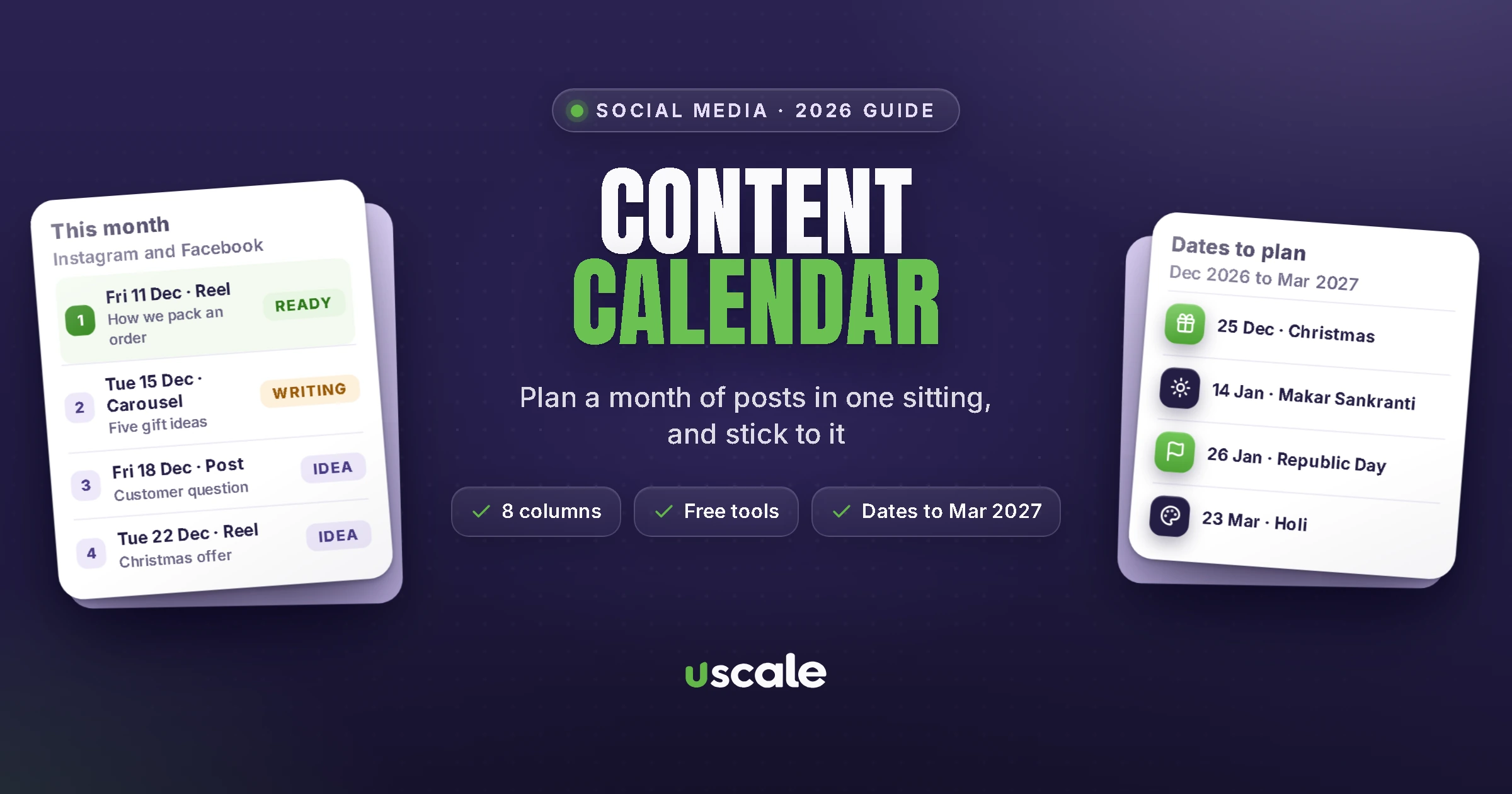
Keep it to the columns you’ll actually fill. For most small businesses these eight are enough:
Column | What to write | Example |
|---|---|---|
Date and time | When it goes out | Fri 11 Dec, 7 pm |
Platform | Where it goes | Instagram and Facebook |
Format | Reel, carousel, photo post, story or Short | Reel |
Topic | One line on what the post is about | How we pack a wedding order |
Caption | The full text, written in the sheet | Three lines and a question |
Visual | The photo, video or design it needs | 15-second packing clip |
Goal | What you want people to do | Send a WhatsApp enquiry |
Status | Idea, being made, ready, scheduled, posted | Scheduled |
Write the caption in the sheet itself. It’s the part that holds everything up when it’s left to the last minute, and it matters for search too, which comes up below.
How often should a small business post?
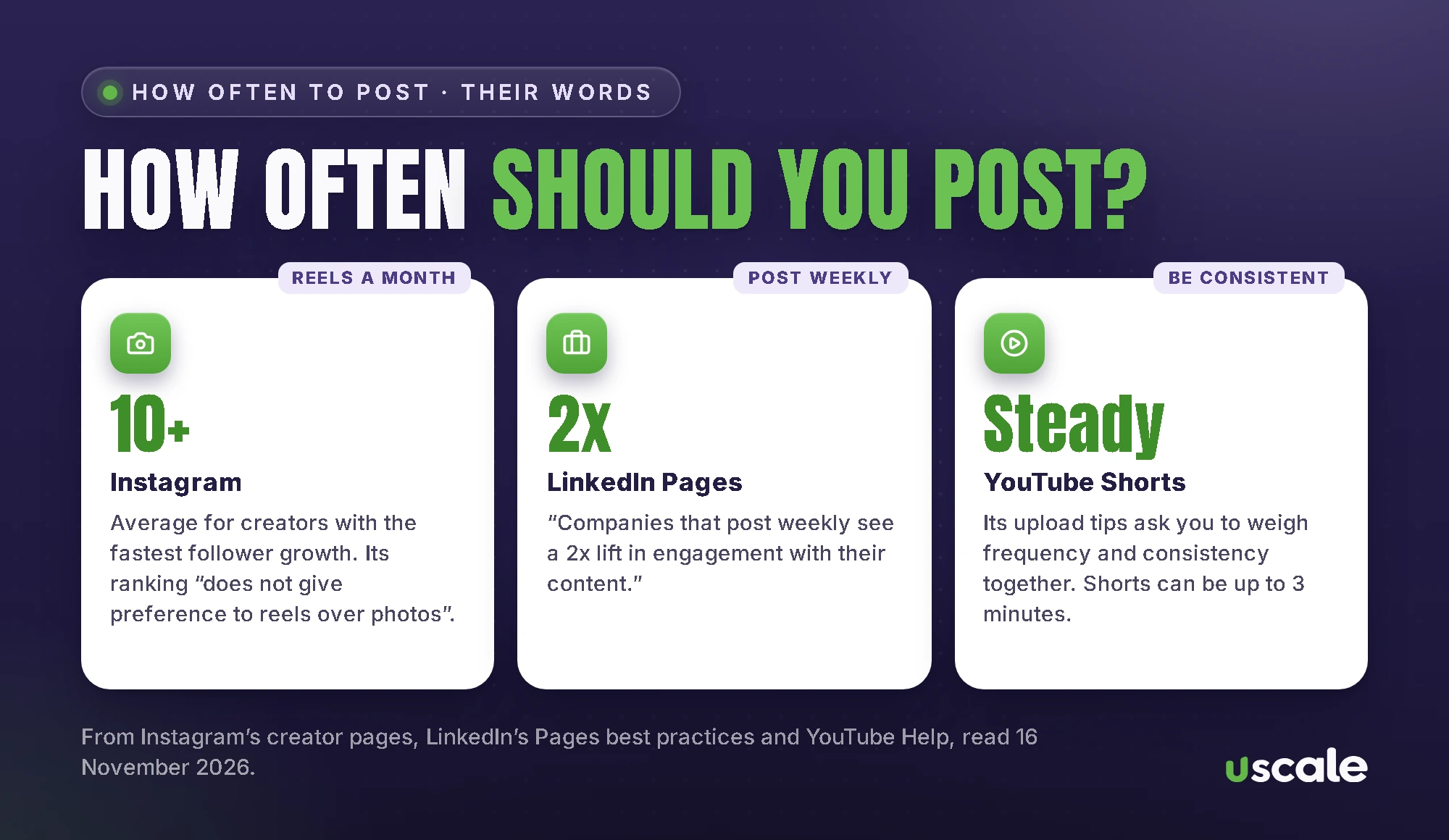
Less often than you’ve been told, and more regularly than you’re doing now. Here’s what the platforms themselves say:
Instagram: it says that the creators with the fastest follower growth post “10 or more reels per month” on average. It also says how often you post is only one of many factors, and that its ranking “does not give preference to reels over photos”.
LinkedIn: its page for business Pages says “Companies that post weekly see a 2x lift in engagement with their content.” Its small-business plan suggests posting once or twice a day, which is more than most owners can keep up. Weekly is a sensible start.
YouTube Shorts: YouTube’s upload tips ask you to look at frequency and consistency together, so pick a pace you can hold.
So a practical month for a local business is three posts a week on Instagram and Facebook, with at least two of them reels, and one post a week on LinkedIn if your buyers are other businesses. A steady pace you keep up does more than a burst you drop after two weeks.
How to build your content calendar in 7 steps
Pick one or two platforms. Go where your customers already are. For most shops, clinics and cafés that’s Instagram, with Facebook alongside. For businesses that sell to other businesses, LinkedIn.
Mark the dates you can’t miss. Festivals, sale days, a new batch, a launch. These go in first, with the post three to five days before the date, not on the day.
Choose three or four repeating post types. For example: a product or service up close, a behind-the-scenes clip, a customer question answered, and an offer. Repeating types make the calendar easy to fill.
Fill the month. Put the repeating types around your fixed dates, so each week has a mix.
Write all the captions in one sitting. Instagram’s own tip for a consistent look is to create “content in bulk”. Captions are the same.
Shoot and design in one batch. One afternoon of photos and clips can cover the whole month.
Schedule it, then check it weekly. Load everything into the scheduling tools, then spend 15 minutes each week on the numbers and replies.
Dates to plan for: December 2026 to March 2027
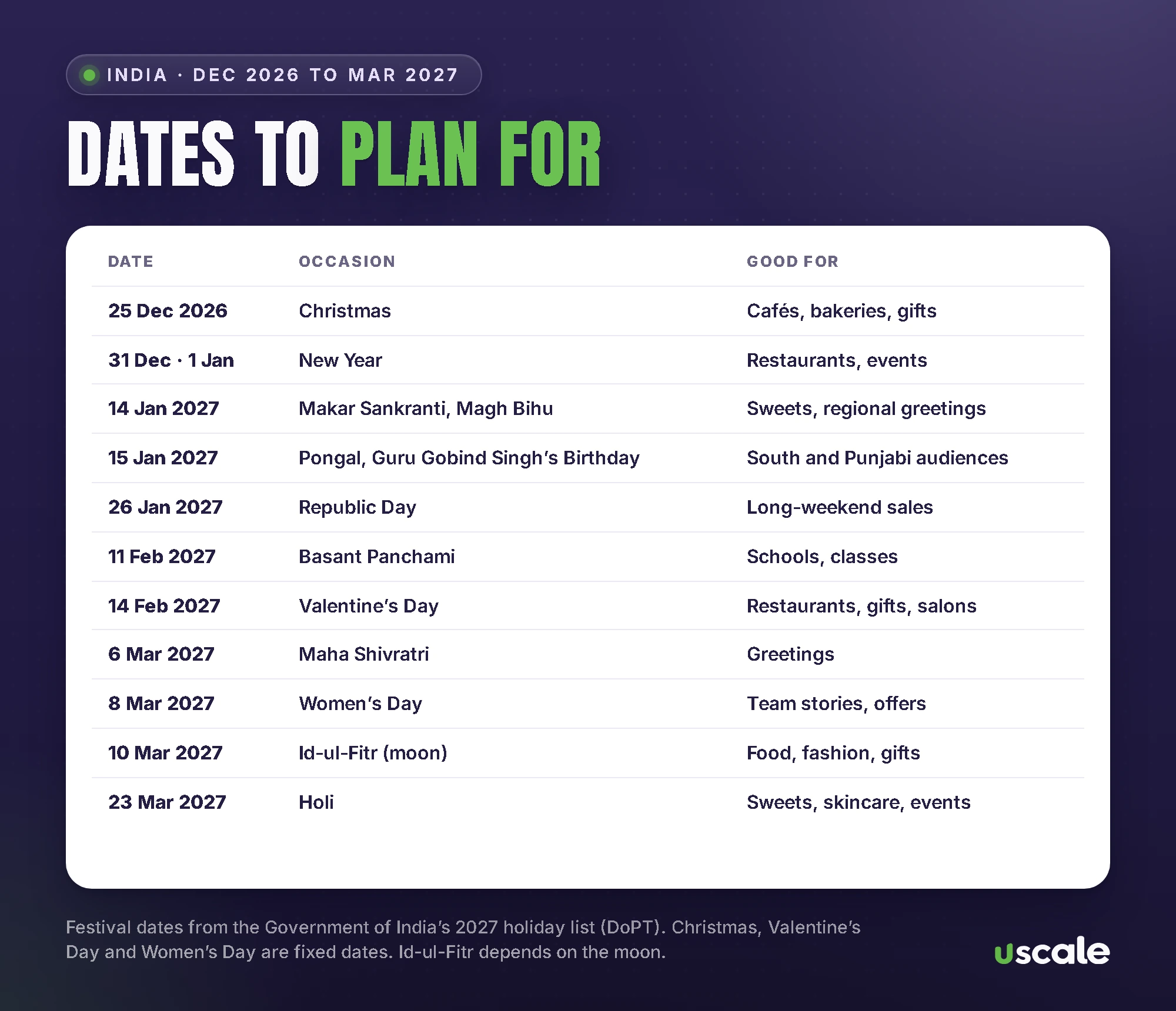
These are from the Government of India’s official list of holidays for 2027, plus a few fixed dates that matter for marketing. Pick only the ones your customers care about.
Date | Occasion | Good for |
|---|---|---|
25 Dec 2026 | Christmas | Cafés, bakeries, gift shops, year-end offers |
31 Dec and 1 Jan | New Year’s Eve and New Year’s Day | Restaurants, events, “year in review” posts |
14 Jan 2027 | Makar Sankranti and Magh Bihu | Sweets, kites, regional greetings |
15 Jan 2027 | Pongal, Guru Gobind Singh’s Birthday | South Indian and Punjabi audiences |
26 Jan 2027 | Republic Day | Long-weekend sales, greetings |
11 Feb 2027 | Basant Panchami | Schools, coaching classes, yellow-themed posts |
14 Feb 2027 | Valentine’s Day | Restaurants, florists, gifts, salons |
19 Feb 2027 | Shivaji Jayanti | Maharashtra audiences |
6 Mar 2027 | Maha Shivratri | Greetings, temple-area shops |
8 Mar 2027 | International Women’s Day | Team stories, women founders, offers |
10 Mar 2027 | Id-ul-Fitr (depends on the moon) | Food, fashion, gifting |
22 to 23 Mar 2027 | Holika Dahan and Holi | Colour-safe skincare, sweets, events |
The government list also notes that dates for Id can move with the sighting of the moon, so keep that post flexible. For the wedding season, which runs alongside all of this, my wedding season plan for local shops has the muhurat dates.
How far ahead can you schedule posts?
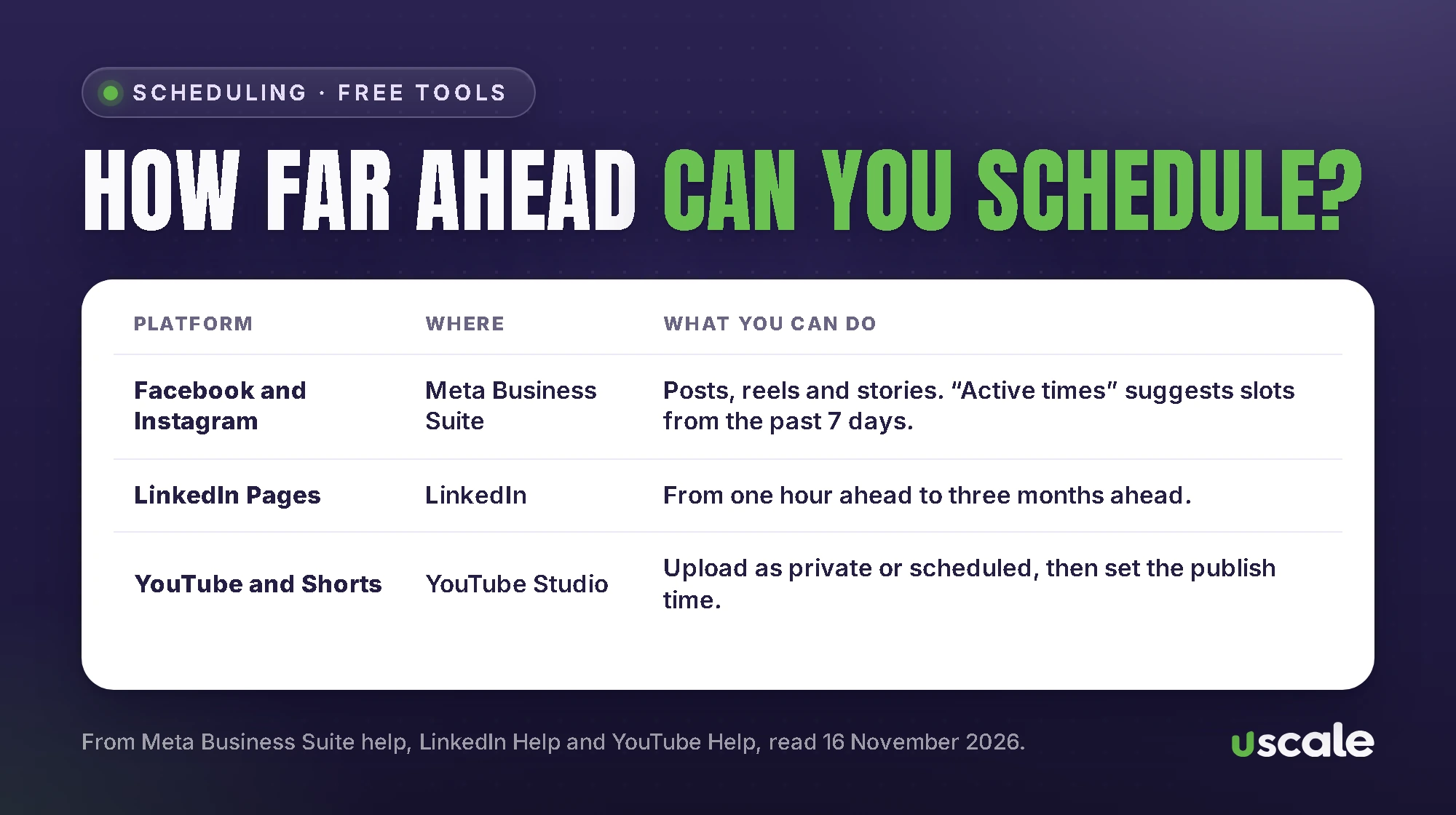
Every main platform lets you schedule for free, inside its own app:
Facebook and Instagram: Meta Business Suite schedules posts, reels and stories for both, and shows them in a weekly or monthly planner. When you pick a time, its “Active times” button suggests slots based on when your followers were most active over the past 7 days.
LinkedIn Pages: you can schedule “anywhere between an hour from the current time to three months in advance.”
YouTube: you upload the video as private or scheduled and pick a publish time.
That’s enough for a monthly calendar. Paid scheduling tools help when you manage many accounts, but a single business rarely needs one.
Social media optimisation: fix the profile before the calendar
Social media optimisation, or SMO, is the set-up behind the posts. It decides whether the people who see a post can find you, understand you and contact you. A month of good posts sends people to your profile, and the profile has to do the rest.
Instagram has explained how its search works. In Adam Mosseri’s words, “The text you enter in the search bar is by far the most important signal for Search. We try to match what you type with relevant usernames, bios, captions, hashtags and places.” So:
put what people search for in your profile name, such as your shop name and area, rather than a slogan,
say what you sell and where in the bio,
write captions in the words customers type, with emojis as extras,
tag the location on posts and reels.
On LinkedIn, the platform says “Pages with complete information get 30% more weekly views.” Fill in the logo, description, website and industry before you post anything.
If you’d rather someone set this up with you, the social media optimisation I do in Mumbai starts with this checklist before any calendar. If you talk to an SMO agency in Mumbai instead, ask what they’ll change on the profile in the first month.
How to know if your calendar is working
Look once a week, not every hour. Meta’s Insights overview covers the past 28 days, with views and follows. Instagram’s own advice is to study your account and content insights “to understand who views your content and what they enjoy.” LinkedIn Page analytics break down your followers and how each post did.
Three numbers are enough to start: how many people saw your posts, how many saved or shared them, and how many messaged or called you. The last one matters most. Next month, make more of what led to messages, and drop what didn’t. For what Instagram itself rewards, see my guide to how the Instagram algorithm works in 2026.
Mistakes that make a content calendar fall apart
Planning a whole year in one go. Plan a month. Things change.
Too many platforms. Two done well beat five done badly.
Posting the festival greeting on the festival day, when everyone else does. Post a few days before, with something useful.
Leaving captions for later. The caption is half the post.
Never replying. Instagram suggests replying to comments on your reels within the first few days. A post that gets questions and no answers looks abandoned.
Not looking at the numbers. Without that weekly check, the calendar repeats the same mistakes every month.
If writing is the part you keep putting off, it’s the easiest piece to hand over. Whoever you hire, whether one of the content marketing companies in India or a freelancer, ask for a price per post so you can see what a month will cost. Mine are on the pricing page: ₹800 for a designed post, ₹1,500 for a carousel and ₹2,500 for a reel edit from your footage.
Want me to plan your first month?
Send me your Instagram or Facebook page. I’ll check the profile and tell you what to post in the next four weeks, free.
Frequently asked questions
It’s a written schedule of the posts you’ll publish: one row per post with the date, platform, format, topic, caption, visual and status. You make it a few weeks ahead so you’re never posting in a hurry.
Three posts a week, with at least two reels, is a practical start for most local businesses. Instagram says its fastest-growing creators post 10 or more reels a month on average, but also that posting frequency is only one of many factors.
Meta Business Suite schedules Facebook and Instagram posts, reels and stories ahead. LinkedIn lets Pages schedule from an hour ahead to three months ahead. YouTube lets you upload a video as private or scheduled and set a publish time. All three are free.
SMO is setting up your profiles so people can find and understand them: a name people search for, a bio that says what you sell and where, captions in the words customers type, and contact buttons that work. Instagram says it matches searches with usernames, bios, captions, hashtags and places.
No. A spreadsheet is enough to plan, and Meta Business Suite, LinkedIn and YouTube all have free scheduling. Paid tools help when you manage many accounts.
From the Government of India’s 2027 holiday list: Makar Sankranti (14 January), Pongal (15 January), Republic Day (26 January), Basant Panchami (11 February), Maha Shivratri (6 March), Id-ul-Fitr (10 March, depending on the moon) and Holi (23 March). Add fixed dates like Valentine’s Day and Women’s Day if they suit your business.
It depends on how much you post. With U Scale, posts are priced by the piece: ₹800 for a designed post, ₹1,500 for a carousel and ₹2,500 for a reel edit, with community and inbox management at ₹12,000 a month if you want replies handled too.
Written by Mehul Karotra
Mehul Karotra is a UI/UX developer-designer in Mumbai. Through U Scale he personally builds websites and runs SEO, social media, ads and AI search visibility for Indian businesses.