How to Rank on Google Maps in 2026: 12 Steps for Indian Shops
Google ranks local results on relevance, distance and prominence. Here are 12 steps, in priority order, that any Indian shop can start this week, taken from Google’s own guidelines, plus the shortcuts that get a profile suspended.
 Mehul KarotraFounder, U Scale
7 min read
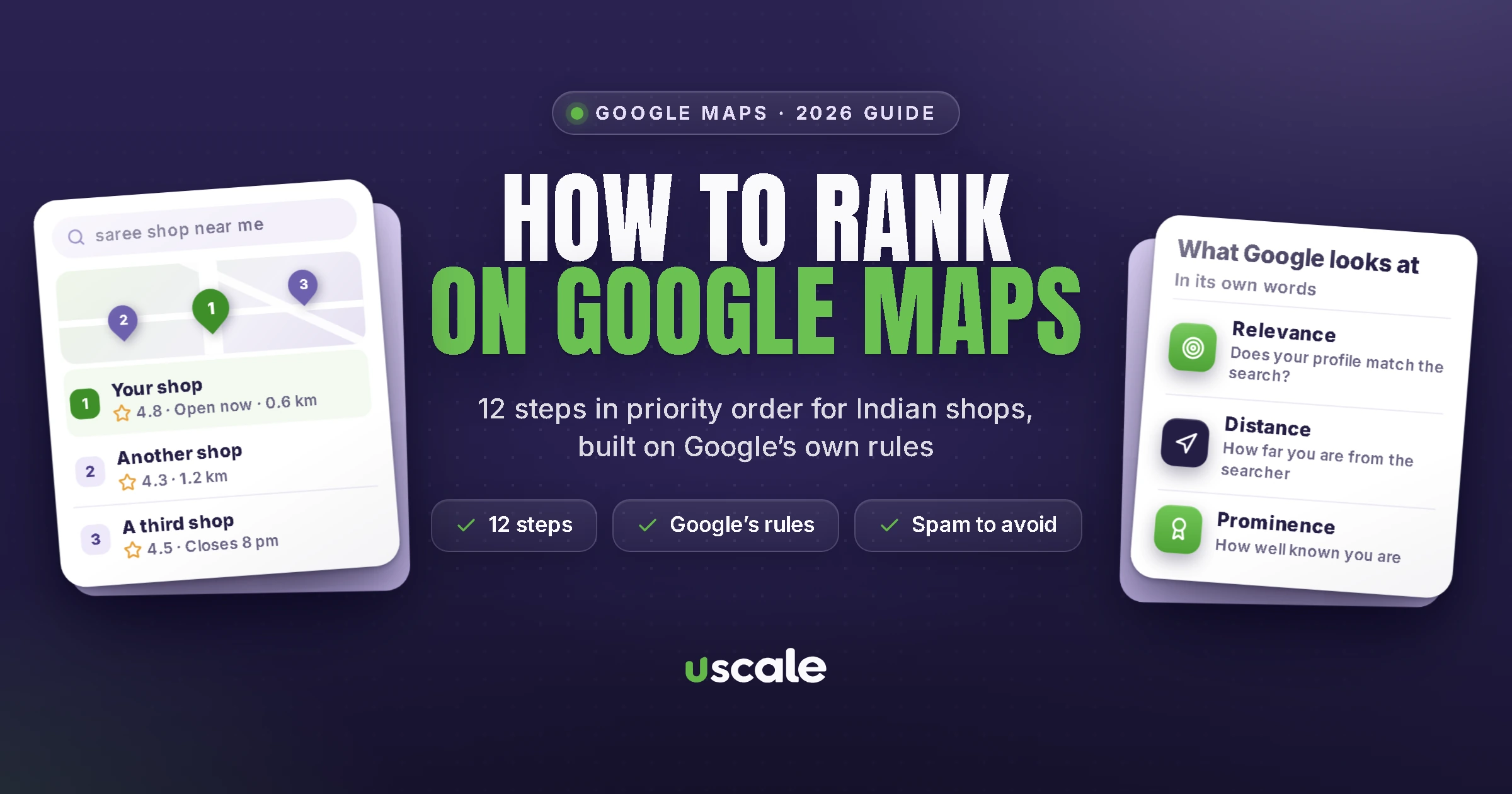
Search “saree shop near me” or “dentist in Ghatkopar” and Google shows a map with a short list of businesses above everything else. People see that list before they see any website. This guide is about how to rank on Google Maps: how to get your shop into that list, and higher up it.
Google publishes more about this than most people realise. On 10 November 2026 I went through its Business Profile help pages and policies line by line. This guide turns what they say into 12 steps, in the order I’d do them for an Indian shop, plus the shortcuts that get profiles suspended.
What decides who shows up first on Google Maps?
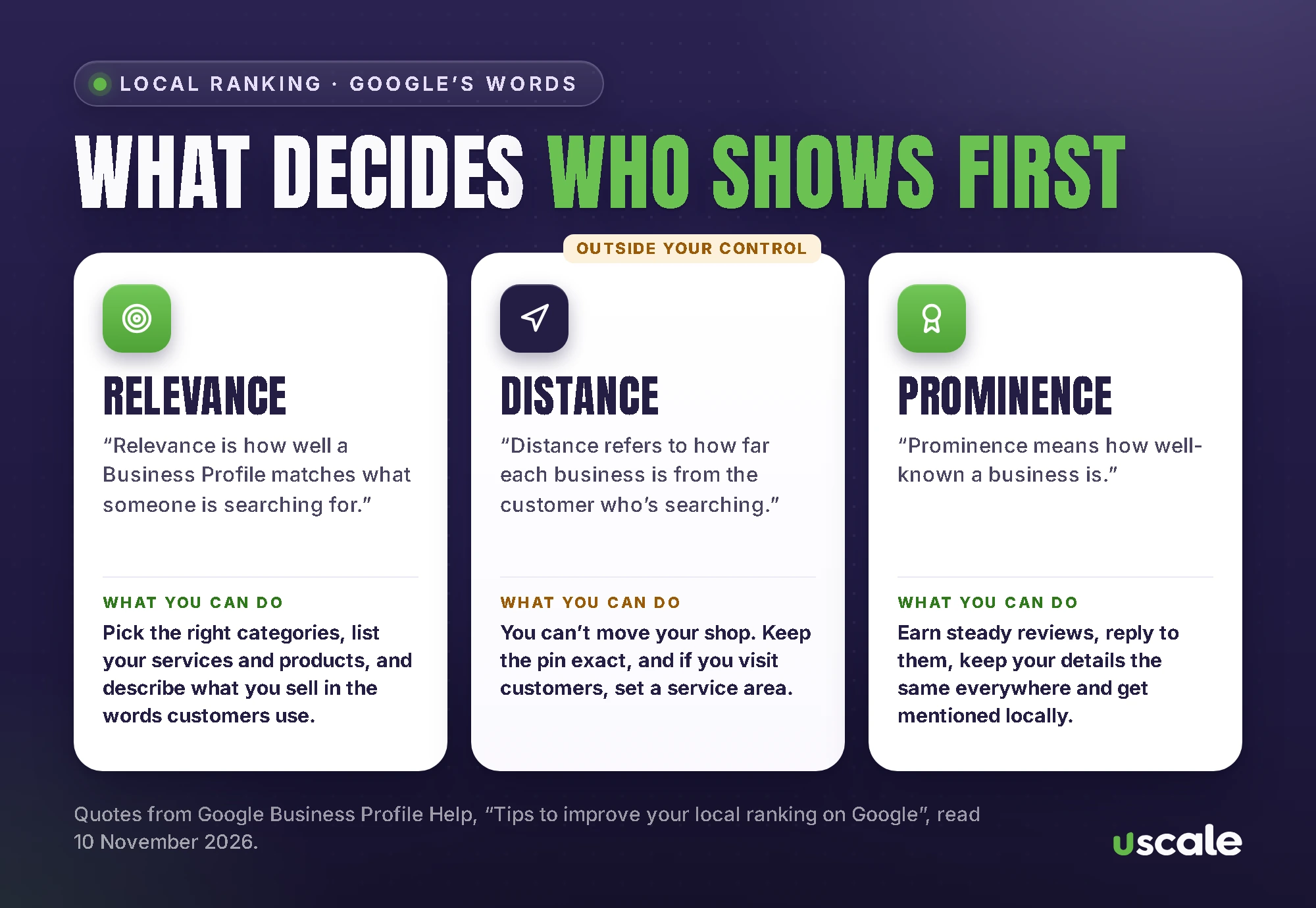
Google’s help page “Tips to improve your local ranking on Google” names three factors. In its words:
Relevance is “how well a Business Profile matches what someone is searching for.” Complete, detailed information helps Google match you to the right searches.
Distance is “how far each business is from the customer who’s searching.” If the customer doesn’t share their location, Google uses what it knows about it.
Prominence “means how well-known a business is.” Google adds that it’s “based on info like how many websites link to your business and how many reviews you have”, and that “more reviews and positive ratings can help your business’s local ranking.”
The same page is blunt about money: “There’s no way to request or pay for a better local ranking on Google.” Ads can appear on Maps, but Google labels them, and they don’t move you up the free list. Anyone selling a guaranteed top spot on Maps is selling something Google says doesn’t exist.
How to rank higher on Google Maps: 12 steps
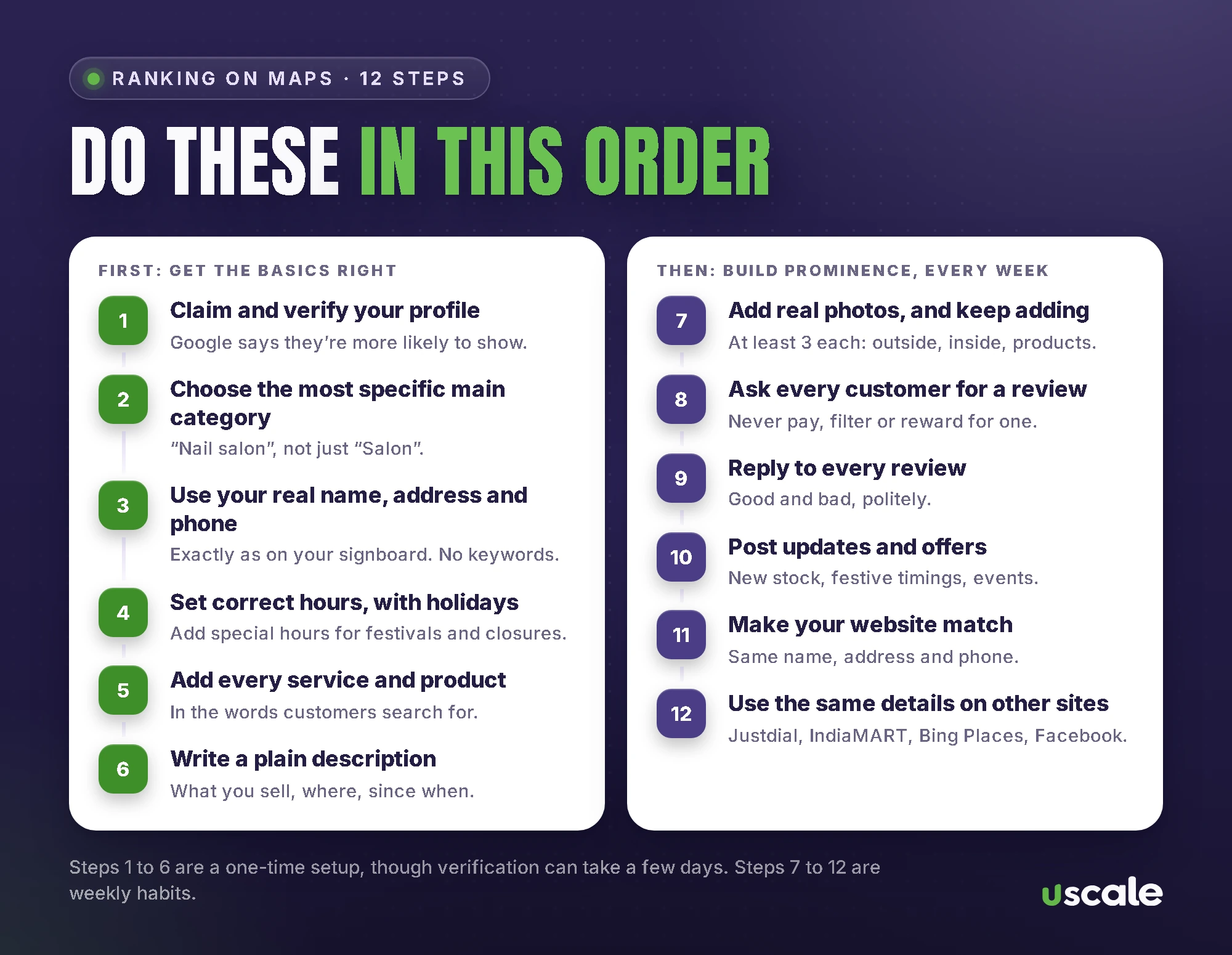
Do them in this order. The first six are a one-time setup. The last six are habits that build prominence month after month.
1. Claim and verify your profile
Google says verifying “tells Google that you’re authorized to represent the business, so it’s more likely to show up in search results.” It also unlocks your photos: they only show once the business is verified. Google reviews verification in up to 5 business days, and most codes sent by post arrive within 14 days. My step-by-step verification guide covers every method.
2. Choose the most specific main category
Google says “the categories you select affect your local ranking on Google” and asks for a specific one: “instead of “Salon,” choose “Nail salon.”” Add extra categories only for real departments or services. Google’s test is that a category should complete the sentence “This business IS a”, not “this business HAS a”. Editing a category can mean verifying again, so choose carefully.
3. Use your real name, address and phone number
Your name on Google should match your signboard, website and bills. Adding words like “Best Saree Shop Ghatkopar” isn’t allowed. Google’s guidelines say “including unnecessary information in your business name isn’t permitted, and could result in the suspension of your Business Profile.”
If customers come to you, show your full address. If you go to them, like a plumber, an AC repair service or a home tutor, Google asks you to hide your address and set a service area instead: up to 20 areas, no more than about 2 hours’ drive from your base. A virtual office or a P.O. box isn’t eligible at all.
4. Set correct hours, including special hours
Google lists “your business hours, including special store hours” among the details that help you show up for the right searches. Add special hours before Diwali, Christmas and other holidays, and for any days you’re closed.
5. Add your services and products
Google says that when people search for something you offer, “that service may be highlighted on your profile.” Name services the way customers say them: “bridal blouse stitching”, not “custom tailoring solutions”. Keep prices and phone numbers out of service names, because Google rejects those. Shops can also add products with photos through the product editor.
6. Write a plain description
Say what you sell, where you are and how long you’ve been there, in two or three sentences. Skip the keyword lists and the links. The description is for customers more than for Google: it should answer what they’d ask before calling.
7. Add real photos, and keep adding
Google says photos “can also help make your business stand out on Google”, and asks for at least three each of the outside, the inside and your products. They should be real: “in focus, well lit, and have no significant alterations or excessive use of filters or AI.” Add a few new ones every month, especially when new stock comes in.
8. Ask every customer for a review
Reviews feed prominence directly, and asking is allowed. Google suggests you “ask customers to visit a Google link or scan a QR code.” What isn’t allowed is offering anything in return. A discount, a free item or a lucky draw for reviews “is considered fake & misleading content and is strictly prohibited.” You also can’t ask only your happy customers, or set your staff a target number of reviews. My guide to getting more Google reviews has wording that works, and the free review QR code maker gives you a counter card in a minute.
9. Reply to every review
Google says replying “shows that you value their feedback” and that “positive reviews and helpful replies can help your business stand out.” Thank people for the good ones. For a bad one, apologise, give a number to sort it out, and never argue in public.
10. Post updates and offers
Posts appear “directly with your customers on Search and Maps.” You can post updates, offers and events, and schedule them to repeat. Posts older than six months are archived unless you set a date range, so a post every month keeps your profile looking active.
11. Make your website match
Prominence also counts “how many websites link to your business”, and your own website is the first of them. Use exactly the same name, address and phone number as on Google, mention your area on the page, give each main service its own page, and link to your Google profile. If you don’t have a website yet, a simple, fast business website is the base for everything else in this guide.
12. Use the same details on other sites
List your business on Justdial, IndiaMART, Bing Places and Facebook with the same name, address, phone number and hours. Mentions from your trade association, a supplier’s dealer list or local news help too: each is one more website that knows about you.
How my free checker scores a profile
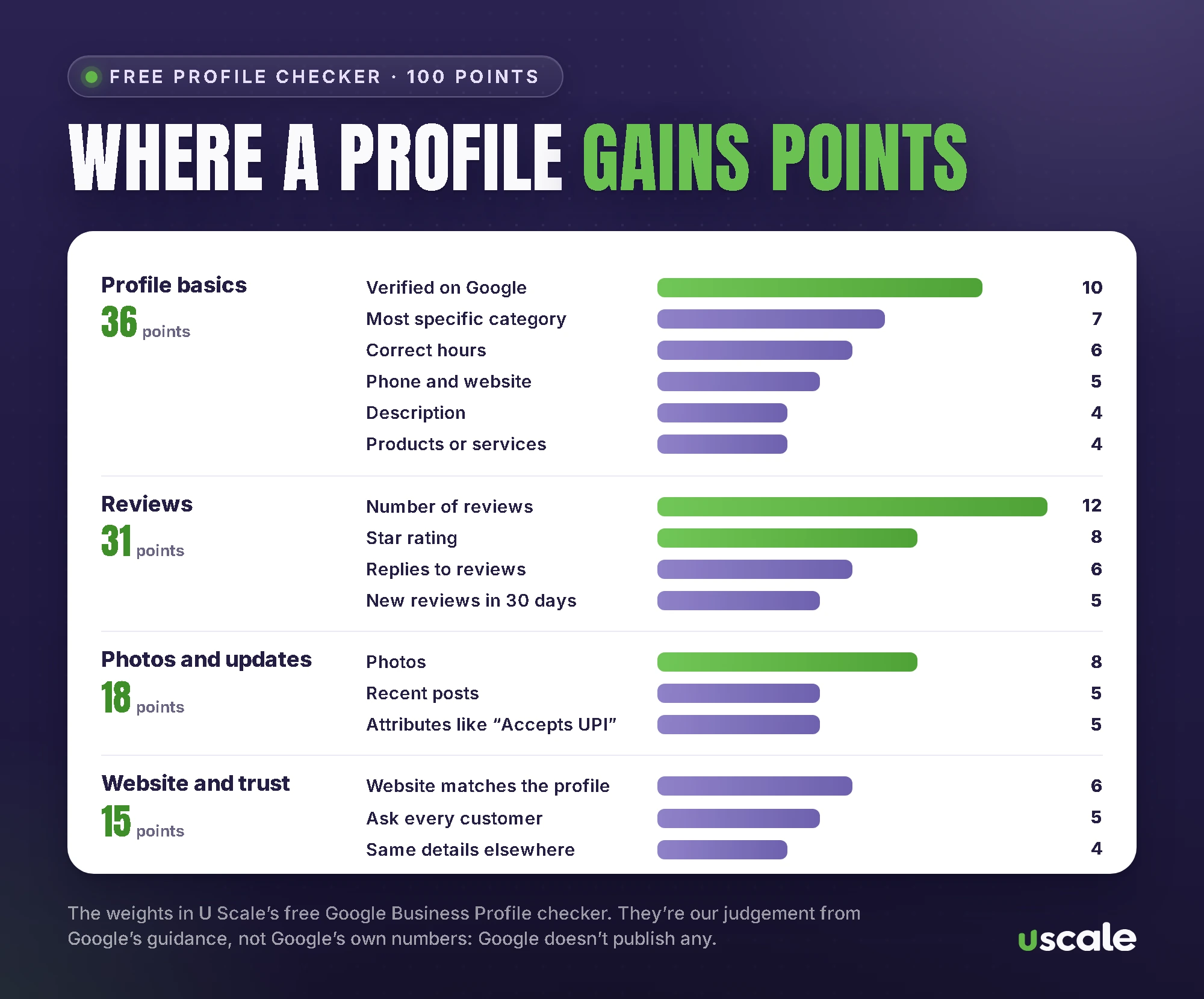
My free Google Business Profile checker asks 16 questions and scores your profile out of 100, then tells you what to fix first. The weights above are my judgement from Google’s guidance, not Google’s numbers: Google doesn’t publish any. Reviews and the profile basics carry the most points because Google names them directly.
What gets a Google Business Profile suspended?
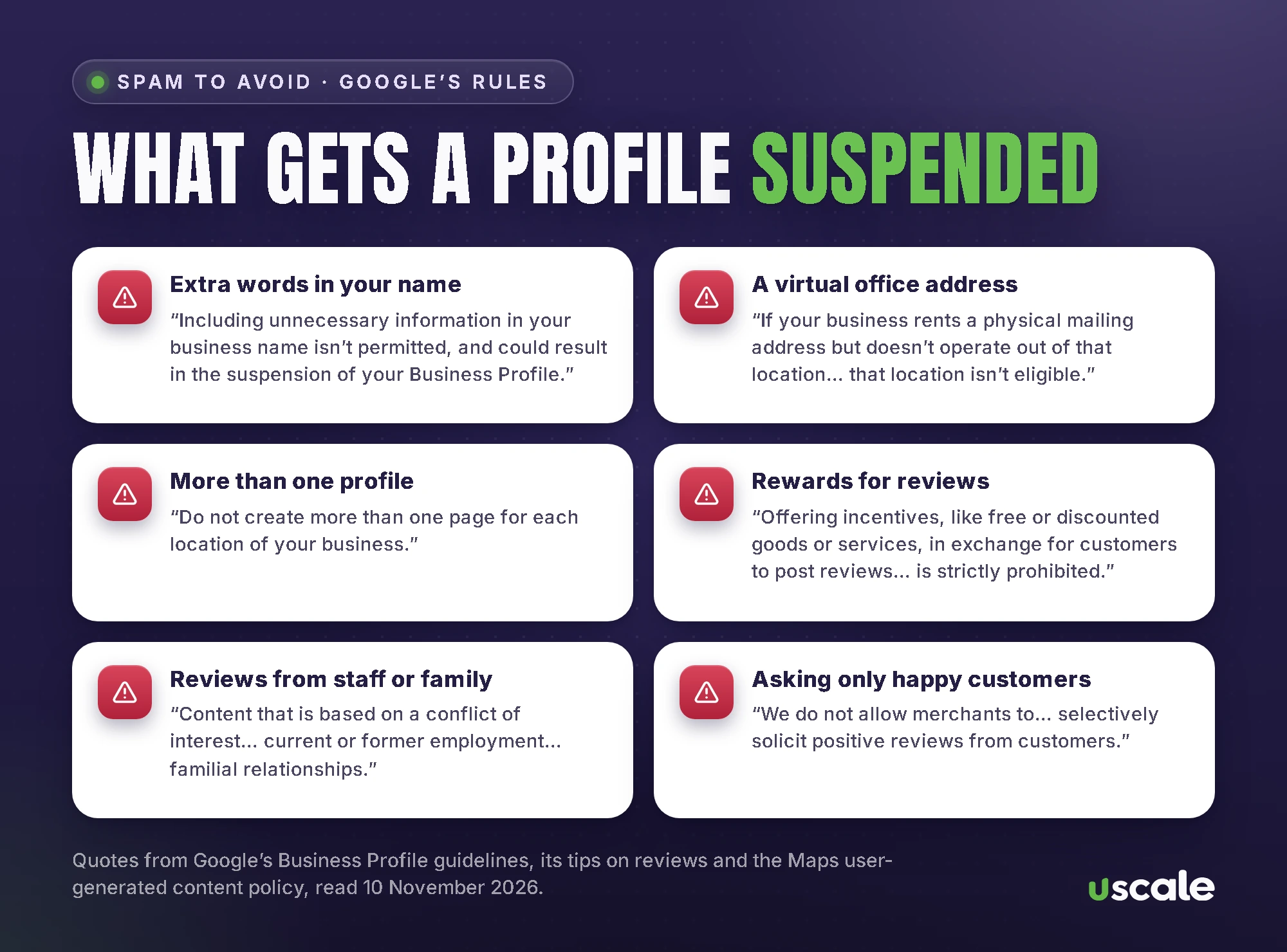
Google enforces these rules at scale. In April 2026 it said its systems had blocked or removed over 292 million policy-violating reviews and removed over 13 million fake Business Profiles. When it finds fake reviews, it can stop a profile receiving new reviews for a while, hide its existing reviews, and show customers a warning that fake reviews were removed. In 2025 Google also began alerting businesses in India when it removes suspicious five-star reviews.
The shortcuts that get profiles into trouble:
keywords or a location added to the business name;
a virtual office, a P.O. box or a co-working desk you don’t actually staff;
a second profile for the same location;
paid or rewarded reviews;
reviews from staff, family or anyone with a conflict of interest;
asking only happy customers for reviews.
If your profile is suspended, don’t make a new one. Google’s instruction is plain: “Do not create a new Business Profile for the same business.” Appeal instead, with proof such as your business registration, a licence, tax certificates or a utility bill. An appeal can only be submitted once, so send everything the first time. If you’d rather hand this over, it’s part of my Google Business Profile management.
How long does it take to rank on Google Maps?
Google doesn’t give a timeline. Its only official timings are for verification (reviews take up to 5 business days) and service-area changes (up to 48 hours). Fixing the basics changes what Google knows about you straight away. Prominence is slower by nature: reviews, photos and mentions build up over months. Be wary of anyone who promises the top spot in 30 days.
If your business doesn’t show on Maps at all, start with my guide to a business not showing on Google Maps. If you want help across Google, your website and AI search, see local SEO in Mumbai.
Want your Google profile checked properly?
Send me your Google Maps link. I’ll check it against Google’s rules and tell you the three fixes that matter most, free.
Frequently asked questions
Verify your Google Business Profile, choose the most specific main category, use your real name, address and phone number, keep your hours correct, add your services, products and real photos, and ask every customer for a genuine review and reply to it. Then use the same details on your website and on other listing sites. All of this is free.
No. Google’s help page on local ranking says: “There’s no way to request or pay for a better local ranking on Google.” Ads can appear on Maps, but they are labelled as ads and don’t change the order of the free results.
Yes. Google says prominence is partly based on how many reviews you have, and that “more reviews and positive ratings can help your business’s local ranking.” The reviews must be genuine: offering a discount, a gift or anything else in return for a review is against Google’s policy.
No. Google’s guidelines say your name should be your real-world name, as on your signboard, and that “including unnecessary information in your business name isn’t permitted, and could result in the suspension of your Business Profile.”
Usually because the profile isn’t verified, has been suspended, has the wrong pin or category, or is a service-area business with no service area set. My guide to a business not showing on Google Maps checks the 11 most common causes in order.
Google doesn’t give a timeline. Verification reviews take up to 5 business days, and service-area edits up to 48 hours. Fixing your profile’s basics changes what Google knows about you straight away; reviews, photos and mentions on other sites build up over months.
Written by Mehul Karotra
Mehul Karotra is a UI/UX developer-designer in Mumbai. Through U Scale he personally builds websites and runs SEO, social media, ads and AI search visibility for Indian businesses.